How to use
- On the Auction Items page select "Customize"
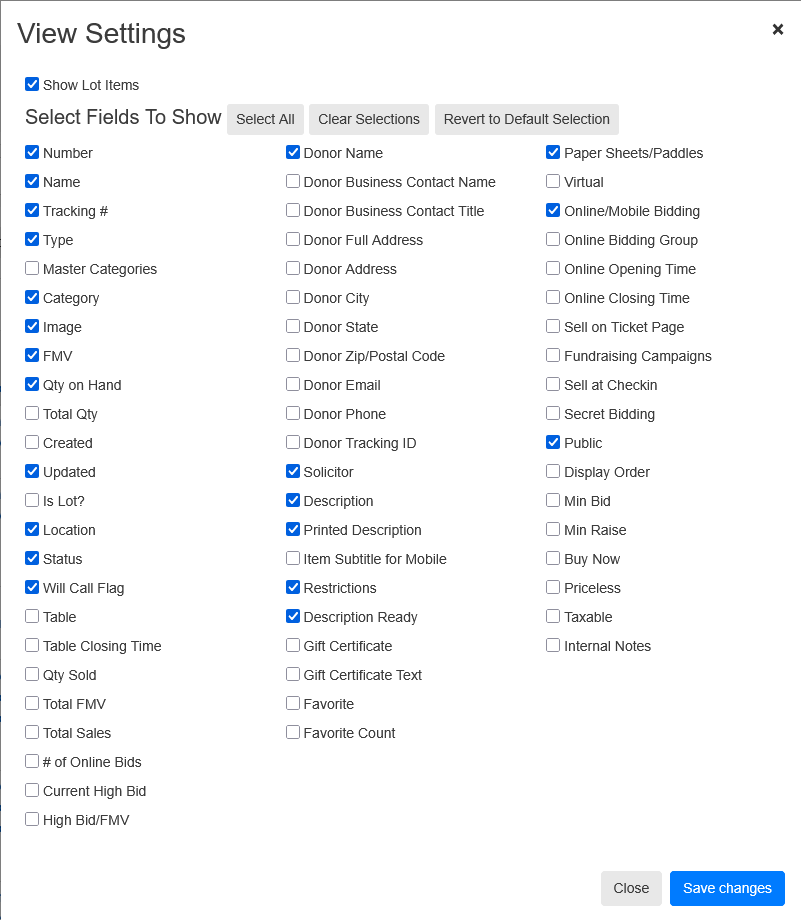
- Ensure that the check boxes match the ones in the image below (more check boxes are okay) and saved:
- Select the "Save As CSV" button
- Find where the file has been downloaded and drag it to the designated area or open the file through the dialog by clicking the designated area.
List of Potential Problems Detected
- If the name is over 35 characters, It will display an estimate of the truncated name
- If the name has the format "$X Gift.."
- Missing images, descriptions, solicitors, will call flags
- NLP to suggest categories if there is a mismatch
- If the Main Description is more than 400 characters and there is no Print Description
- If the Print Description is over 400 characters
- Potential missed Restriction Descriptions
- Currently checks the Description for the (partial) words: "only", "must", "valid", "expir", "minimum", "maximum", "limit", "not includ", "doesn't includ", "cannot", "can not"
- Will output a snippet of the description with the found word(s)